
Scheduled jobs
How do you show what a scheduled job actually found?
Check that the input arrived before showing a result. Record a real zero quietly, alert the owner when there is work to do, and show a missing export as a separate result.
Set up a morning order check
This fictional shop expects a new export before 9 a.m. and wants to see orders still marked Payment pending from before today. Use a sample export with the order number, order date and status.
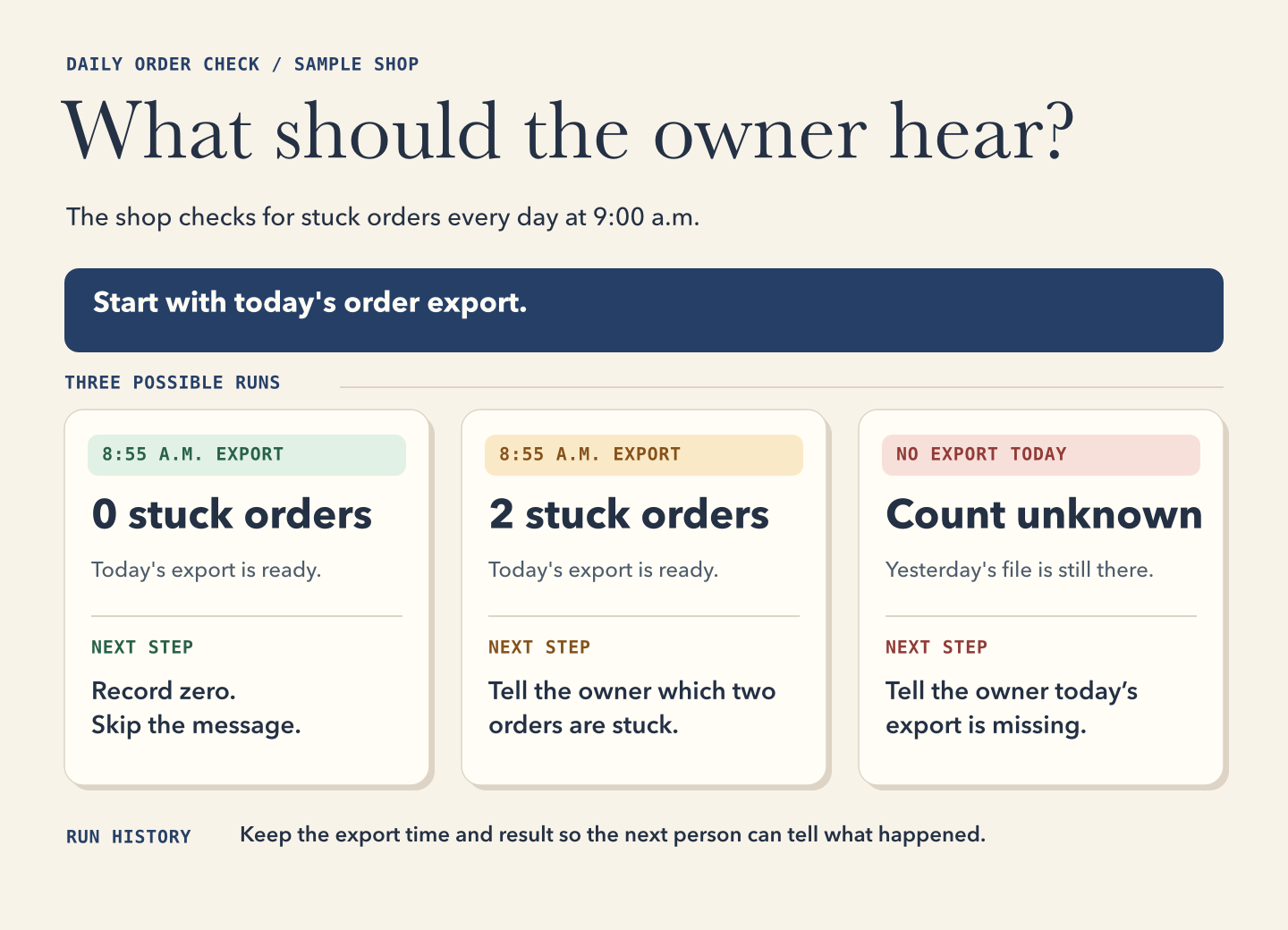
- Check the export first. At 9 a.m. in the shop’s time zone, look for today’s file. Check that it opens and has the expected columns. If a check fails, show what is missing and ask the owner for a fresh export.
- Count the orders that need attention. In a valid export, count orders dated before today with the status Payment pending. Save the count with the time of the export. When the count is zero, leave the result in the job history.
- Show the owner what to do next. If any orders match, send one message with their order numbers and a link to the order list. Try the check with a valid export with zero matches, a valid export with two matches, and a missing file. Compare each result with the diagram.
Can a job finish successfully while its input is missing?
Yes. A job can finish its steps without finding the expected file. Check the export date and required columns before counting orders.
When should the shop owner get a message?
Send a message when the job finds an order that needs attention or when the owner needs to fix the input. Keep the routine zero in the job’s results.